Introduction
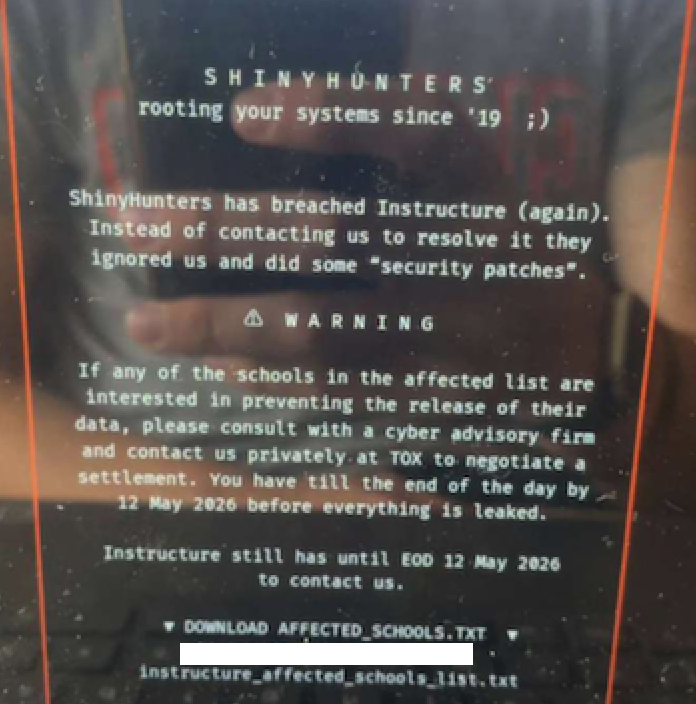
In May 2025, the widely used education technology platform Canvas experienced a severe data extortion attack. The cybercrime group ShinyHunters defaced the login page with a ransom demand, threatening to leak data from 275 million students and faculty across nearly 9,000 institutions. Canvas parent company Instructure temporarily took the platform offline to mitigate damage, but the incident disrupted classes and exams nationwide. This guide provides a step-by-step response plan for schools and colleges to follow in the event of a similar extortion attack on their Learning Management System (LMS).

What You Need
- Incident Response Team: Designate key personnel (IT security, legal, communications, executive leadership) and establish clear roles.
- Communication Channels: Have pre-set methods for internal alerts (e.g., Slack, email) and external notifications (website, social media, email lists).
- Backup & Disaster Recovery Plan: Regularly updated backups of LMS data and a tested recovery process.
- Cybersecurity Insurance: Policies that cover extortion and data breach response costs.
- Legal Counsel: Access to attorneys specializing in data privacy and cyber incidents.
- Incident Tracking Tool: System to log actions, timestamps, and decisions (e.g., ticketing software).
Step-by-Step Response Plan
-
Step 1: Immediately Isolate the Affected System
As soon as the extortion message appears or unauthorized activity is detected, take the LMS offline to prevent further damage. In the Canvas attack, Instructure disabled the platform and replaced the login page with a maintenance notice. Action items:
- Cut network connectivity to the LMS server.
- Block access from external IPs if possible.
- Change all administrative passwords and revoke active sessions.
- Document the exact time and content of the extortion message for evidence.
-
Step 2: Activate Your Incident Response Team
Gather the designated team immediately. The group should include IT security, legal counsel, communications lead, and a university or district representative. Critical tasks:
- Assign a lead coordinator.
- Review the incident timeline and initial findings.
- Engage external cybersecurity forensics firms if needed.
- Contact law enforcement (e.g., FBI, local cybercrime unit).
In the Canvas case, Instructure acknowledged the breach earlier in the week and said the incident was contained—but the defacement occurred later, highlighting the need for continuous monitoring even after initial containment.
-
Step 3: Preserve Evidence and Assess the Breach Scope
Do not touch the compromised systems until forensic analysis is complete. Focus on:
- Take forensic images of affected servers and logs.
- Identify which data was accessed or exfiltrated. In the Canvas attack, stolen data included names, email addresses, student IDs, and private messages—but no passwords or financial info.
- Determine if the attacker still has access. Check for backdoors or persistence mechanisms.
- Engage a third-party incident response firm if internal resources are insufficient.
-
Step 4: Communicate Internally and Externally
Clear, transparent communication is vital to maintain trust and prevent panic. Guidelines:
- Internal: Notify faculty, staff, and students about the downtime and what to expect. Use email, intranet, or mass notifications.
- External: Publish a brief statement on your website and social media. Acknowledge the incident, confirm investigations are underway, and provide alternative contact methods.
- Regulatory bodies: If student data is involved, comply with data breach notification laws (e.g., FERPA, state laws). The timeframes vary, but often require notification within 30 days.
Instructure initially stated Canvas was fully operational on May 6, but the defacement on May 7 forced them to take the platform offline. Proactive communication can reduce confusion.
Source: krebsonsecurity.com -
Step 5: Evaluate the Extortion Demand and Ransom Viability
The extortion message from ShinyHunters advised schools to negotiate their own ransom payments. Considerations:
- Do not pay the ransom without consulting legal counsel and law enforcement. Paying does not guarantee data deletion and may fund further attacks.
- If the threat is public and data is already leaked, payment is futile.
- Assess the sensitivity of the stolen data. In this case, the data was not highly sensitive, but the volume (275 million records) increased reputational risk.
- Engage a professional negotiator if you choose to respond to the demand.
-
Step 6: Restore Operations from Clean Backups
Once forensic analysis is complete and the system is clean, restore the LMS from backups taken before the breach. Steps:
- Ensure backups are uncompromised (test in isolated environment).
- Wipe and rebuild affected servers.
- Deploy updated security patches and configurations.
- Implement multi-factor authentication (MFA) for all user accounts.
- Gradually bring the system back online, monitoring for any anomalies.
Instructure pulled Canvas offline for maintenance and restored service after a few hours. Their status page kept users updated.
-
Step 7: Conduct Post-Incident Review and Improve Security
After recovery, hold a review meeting to identify gaps and implement improvements. Areas to address:
- How the attacker gained access (e.g., credential stuffing, phishing, vulnerability exploit).
- Effectiveness of detection and response procedures.
- Enhance monitoring and logging capabilities.
- Increase cybersecurity training for faculty and students.
- Update incident response plan based on lessons learned.
Tips for Long-Term Resilience
- Regularly test your incident response plan with tabletop exercises simulating extortion attacks.
- Maintain offline backups of critical LMS data that cannot be encrypted or altered by attackers.
- Segment network access so that compromise of the LMS does not immediately give access to other sensitive systems.
- Consider a “scheduled maintenance” page that can be quickly deployed to cover any emergency downtime, similar to Instructure’s response.
- Establish relationships with cybersecurity vendors (e.g., CrowdStrike, Mandiant) in advance for faster engagement during an incident.
- Educate users about phishing and social engineering that could lead to credential theft—a common vector for such attacks.
- Monitor dark web forums for mentions of your institution to catch threats early.
By following these steps and tips, educational institutions can minimize disruption, protect sensitive data, and maintain trust during a data extortion attack on their learning management system.