Kubernetes v1.36 marks a significant milestone for those monitoring resource contention: Pressure Stall Information (PSI) metrics have graduated to General Availability (GA). This means you now have a stable, production-ready tool to detect resource saturation before it leads to outages. In this article, we explore five essential things you need to know about this graduation, from what PSI actually measures to the rigorous performance testing that confirmed its readiness—with negligible overhead. Whether you're a platform engineer, SRE, or Kubernetes enthusiast, these insights will help you leverage PSI for more reliable cluster management.
1. What is PSI and Why It Matters
Introduced in the Linux kernel back in 2018, Pressure Stall Information (PSI) provides a much more nuanced view of resource contention than traditional utilization metrics. Instead of just reporting how much CPU or memory is being used, PSI reveals the percentage of time that tasks are stalled while waiting for resources. This stall time is broken down across CPU, memory, and I/O, giving you a clear picture of where the bottleneck really lies. In Kubernetes v1.36, PSI metrics are now available at the node, pod, and container levels, making it easier to pinpoint which workloads are suffering from resource pressure—even when overall utilization appears normal. The graduation to GA means the API is stable and backed by extensive testing, so you can rely on these signals for automated scaling, scheduling, and alerting.
2. How PSI Complements Traditional Metrics
Traditional CPU and memory utilization can be deceptive. A node might show 80% CPU usage, yet certain tasks face severe delays due to scheduling contention. PSI fills this gap by offering two key types of data:
- Cumulative Totals: The absolute time spent in a stalled state since the metric began tracking.
- Moving Averages: Smoothed values over 10-second, 60-second, and 300-second windows. These help distinguish between transient spikes and sustained resource pressure.
With these metrics, you can detect early signs of contention that traditional monitoring might miss. For example, a high 10-second average for CPU PSI could indicate a temporary burst, while a high 300-second average points to a persistent issue that needs remediation, such as adjusting resource requests or moving pods to less loaded nodes.
3. The Road to GA: Rigorous Performance Testing
One of the biggest concerns for any new telemetry feature is its resource overhead. To address this, the SIG Node team conducted extensive testing on high-density workloads—up to 80 pods per node—across various machine types. The goal was to measure the impact of both the Kubelet collecting and serving PSI metrics, as well as the kernel-level tracking itself. Two main scenarios were tested:
- Kubelet Overhead: Comparing clusters with kernel PSI always on but the Kubelet feature gate toggled on vs. off.
- Kernel Overhead: Comparing clusters with the Kubelet feature on but kernel PSI toggled off vs. on.
The results were reassuring: the additional CPU cost was minimal and well within production safety margins.
4. Kubelet Overhead: Negligible Impact on Node Resources
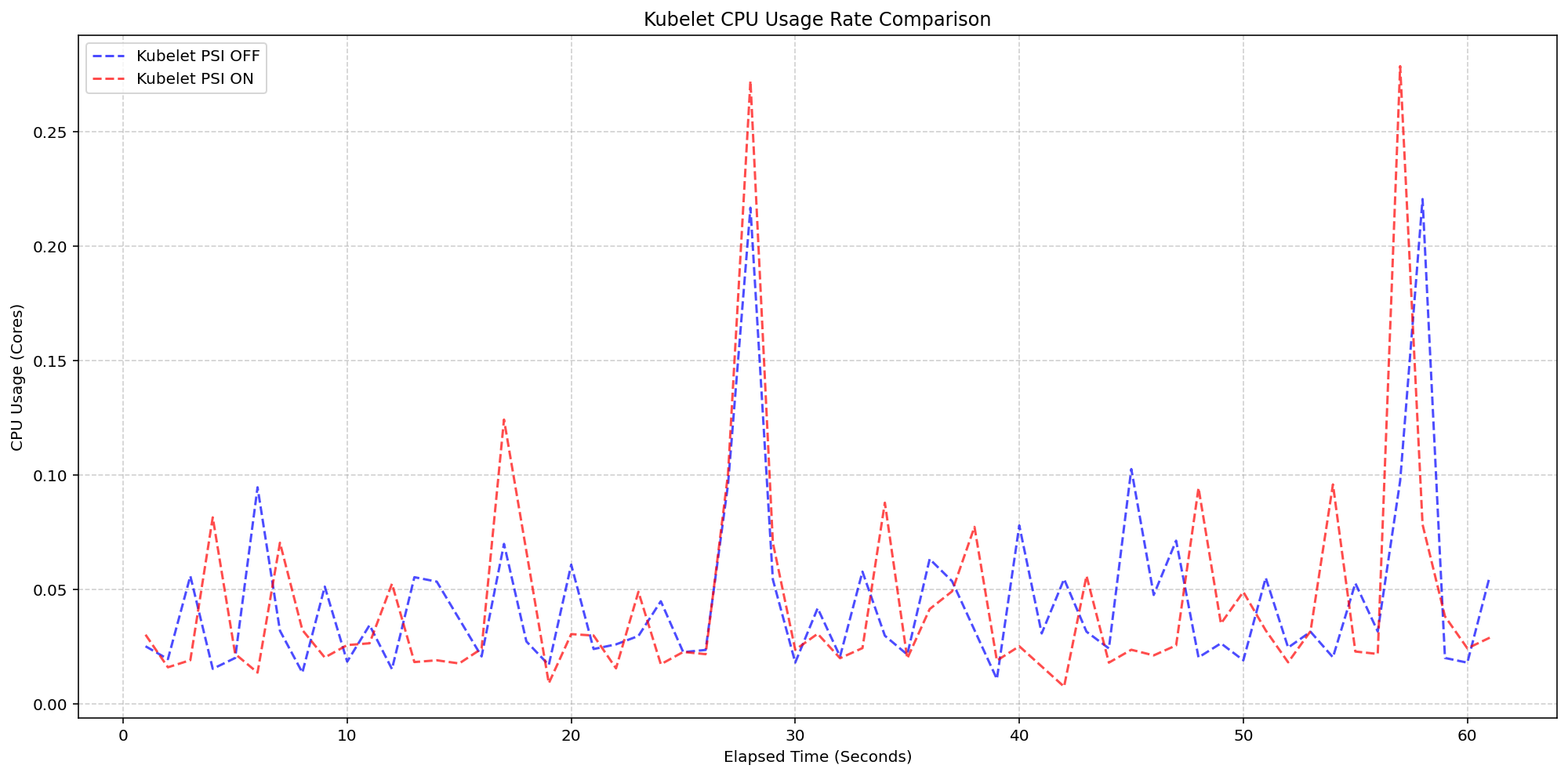
In the first scenario, running on 4-core machines, the Linux kernel was already tracking PSI by default (psi=1). The test toggled the KubeletPSI feature gate to see if actively querying and exposing these metrics would increase Kubelet CPU usage. The synchronized bursts in CPU usage were nearly identical in magnitude and frequency whether the feature was on or off. This confirms that the Kubelet's collection logic is lightweight and blends seamlessly into standard housekeeping cycles. The extra CPU consumption stayed within 0.1 cores—about 2.5% of total node capacity—making it completely safe for production-scale deployments. No pre-existing resource patterns were disrupted.
5. Kernel Overhead: Slight Increase, Still Acceptable
For the second scenario, the team compared system CPU usage when kernel PSI was enabled versus disabled (with the Kubelet feature on in both cases). As shown in the test graphs, the system CPU usage lines for the PSI-enabled clusters (red) followed the same pattern as the disabled ones (blue), with only a slight, expected increase from the baseline. This increase is due to the OS already tracking PSI at the cgroup level—once that tracking is active, the act of Kubernetes reading those cgroup metrics is negligible. On average, the system CPU rose by less than 0.1 cores across the board. This minimal overhead is a small price to pay for the rich, early-warning data that PSI provides.
In conclusion, the graduation of PSI metrics to GA in Kubernetes v1.36 is a game-changer for proactive cluster health monitoring. By offering precise stall-time data with virtually no performance penalty, it empowers operators to detect and resolve resource contention before users are affected. Combine PSI with your existing monitoring stack, and you'll gain a deeper understanding of your cluster's true behavior. Start exploring today—your workloads will thank you.